WhatsApp COD Confirmation and Order Updates for Online Sellers
BlitzShipz WhatsApp COD confirmation checks with your buyer before a cash-on-delivery order ships. The buyer taps Confirm or Cancel, checks their delivery address, and then, once updates are turned on, gets live WhatsApp updates when the order is booked, picked up and delivered. You pay less to ship parcels nobody wanted, and your buyers know where their order is at every step.

Key Facts
- What it is: three WhatsApp automations for your buyer: COD confirmation, address confirmation and live order updates.
- COD confirmation: sent as soon as a COD order reaches BlitzShipz, with Confirm and Cancel buttons.
- Address confirmation: the buyer can type a new address, and you pick auto update or manual approval.
- Order updates: once turned on, at booking (AWB generated), pickup and delivery.
- Sent from: BlitzShipz’s official WhatsApp Business number on Meta’s WhatsApp Business Platform, with your store name in every message.
- Works with: orders from Shopify, WooCommerce, Wix and the Open API.
What Is WhatsApp COD Confirmation?
WhatsApp COD confirmation is a quick check with the buyer before a cash-on-delivery order leaves your warehouse. The buyer gets the order details on WhatsApp and taps one button to confirm or cancel.
Why bother? A COD buyer pays nothing upfront. So some orders are placed by mistake, some twice, and some by people who change their mind a day later. You usually find out only when the parcel comes back, after you have paid to ship it out and paid again to get it back. That return trip is the cost COD confirmation helps you avoid.
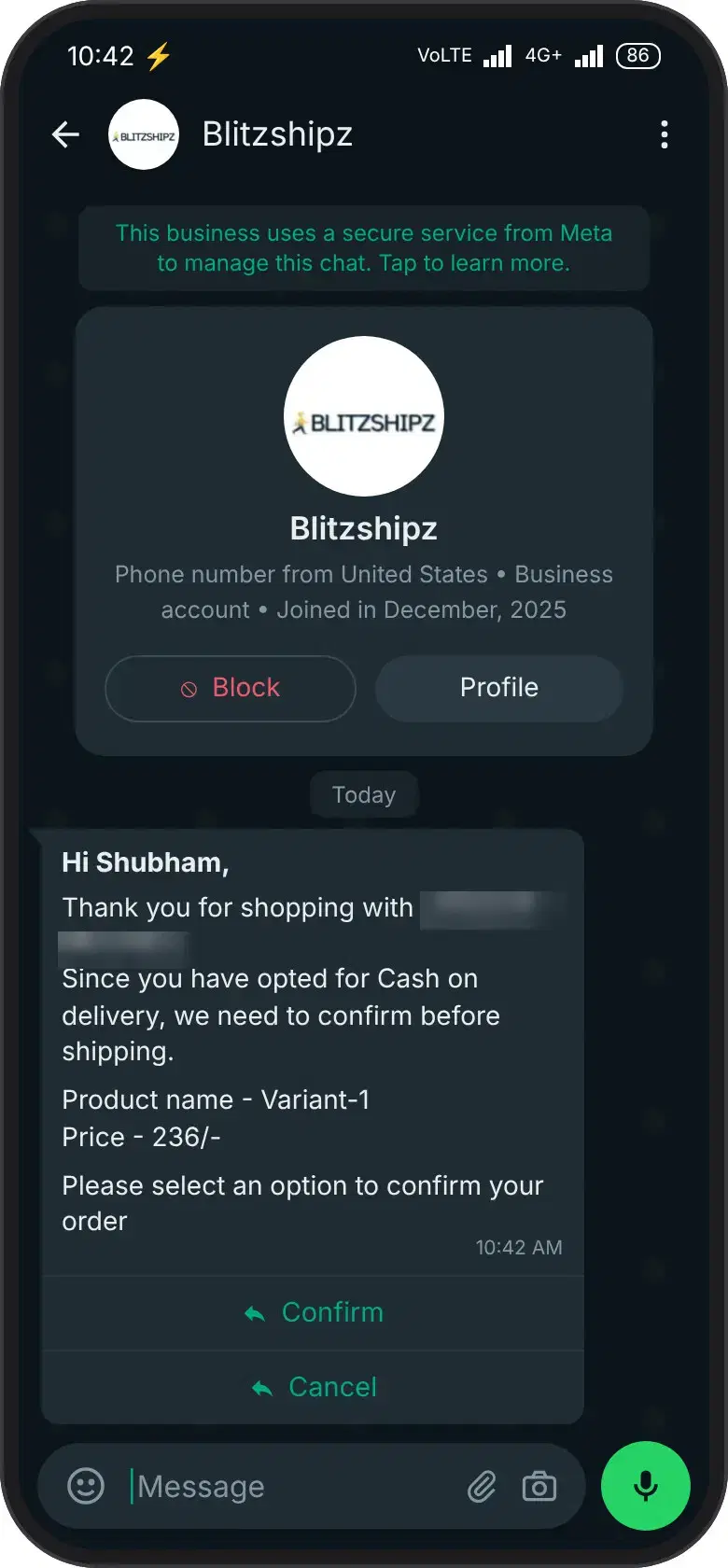
On BlitzShipz, the check starts the moment a COD order lands in your account. Your buyer gets a WhatsApp message with your store name, the product, the price and the COD amount, plus two buttons:
“Hi [Buyer Name], you have a COD order of ₹1,199 from [Your Store] for [Product Name]. Please confirm your order.” [Confirm] [Cancel]
- Buyer taps Cancel: the order stops before it ships. You pay no forward shipping and no return charge on that parcel.
- Buyer taps Confirm: you ship knowing the buyer is expecting it.
Say a buyer places a ₹1,199 COD order for shoes late at night, then finds a cheaper pair the next morning. With COD confirmation on WhatsApp, they tap Cancel before pickup, and that parcel never goes on a truck.
Confirmation lowers the risk, but it is not a guarantee. A buyer who confirmed can still refuse the parcel at the door, so keep following up on failed deliveries from your dashboard.
What Does BlitzShipz Send on WhatsApp, and When?
BlitzShipz runs three WhatsApp communication automations across one order: COD confirmation, address confirmation and live order updates. The order updates go out once they are turned on. Here is what your buyer sees at each step.
| Message | When it goes out | What the buyer does | What it does for you |
|---|---|---|---|
| COD confirmation | As soon as the COD order reaches BlitzShipz | Taps Confirm or Cancel | Stops unwanted COD orders before shipping |
| Address confirmation | After the buyer confirms the order | Taps Yes, or taps No and types the right address | Fixes wrong addresses before dispatch |
| Order booked | When the shipment is created and the AWB (tracking number) is generated | Nothing, it is an update | Buyer knows the order is on its way |
| Picked up | When the courier collects the parcel from you | Nothing, it is an update | Fewer “where is my order?” calls |
| Delivered | When the parcel reaches the buyer | Nothing, it is an update | Closes the loop with your buyer |
COD confirmation
- When it goes out
- As soon as the COD order reaches BlitzShipz
- What the buyer does
- Taps Confirm or Cancel
- What it does for you
- Stops unwanted COD orders before shipping
Address confirmation
- When it goes out
- After the buyer confirms the order
- What the buyer does
- Taps Yes, or taps No and types the right address
- What it does for you
- Fixes wrong addresses before dispatch
Order booked
- When it goes out
- When the shipment is created and the AWB (tracking number) is generated
- What the buyer does
- Nothing, it is an update
- What it does for you
- Buyer knows the order is on its way
Picked up
- When it goes out
- When the courier collects the parcel from you
- What the buyer does
- Nothing, it is an update
- What it does for you
- Fewer “where is my order?” calls
Delivered
- When it goes out
- When the parcel reaches the buyer
- What the buyer does
- Nothing, it is an update
- What it does for you
- Closes the loop with your buyer
Which number do the messages come from? Every message goes from BlitzShipz's official WhatsApp Business number, provided through Meta's WhatsApp Business Platform. You don't need to set up your own WhatsApp API. Your store name sits inside every message, so the buyer knows exactly which brand the order is from.
WhatsApp vs a Phone Call vs No Check: Which Suits Your COD Orders?
For most COD orders, a WhatsApp message is the easiest check to run, because the buyer replies with one tap and nobody on your team has to dial. A phone call still has its place for a few orders, and some orders need no check at all.
| Option | Works well for | Watch out for |
|---|---|---|
| WhatsApp confirmation | Most COD orders. The buyer replies with one tap whenever they see the message, and it runs on its own as orders come in. | Buyers who rarely open WhatsApp may reply late. A buyer who confirms can still refuse at the door. |
| Phone call to the buyer | High-value orders, or addresses that need a conversation to sort out | Someone has to make every call. Missed and busy calls slow down dispatch. |
| No check | Prepaid orders, and repeat buyers you already trust | Unwanted COD orders ship, and you pay both ways when they come back. |
WhatsApp confirmation
- Works well for
- Most COD orders. The buyer replies with one tap whenever they see the message, and it runs on its own as orders come in.
- Watch out for
- Buyers who rarely open WhatsApp may reply late. A buyer who confirms can still refuse at the door.
Phone call to the buyer
- Works well for
- High-value orders, or addresses that need a conversation to sort out
- Watch out for
- Someone has to make every call. Missed and busy calls slow down dispatch.
No check
- Works well for
- Prepaid orders, and repeat buyers you already trust
- Watch out for
- Unwanted COD orders ship, and you pay both ways when they come back.
What to check before you switch it on:
- How many of your orders are COD, and how many COD parcels come back to you.
- Whether your store orders sync into BlitzShipz automatically, through Shopify, WooCommerce, Wix or the Open API.
- Who on your team will review new addresses, if you choose manual approval.
- What your team will do with COD orders that are not confirmed yet: wait, call the buyer or cancel.
Tip: Use WhatsApp as the default check and keep phone calls for your highest-value COD orders. You get speed on most orders and a human touch where it matters.
How Does WhatsApp Address Confirmation Work?
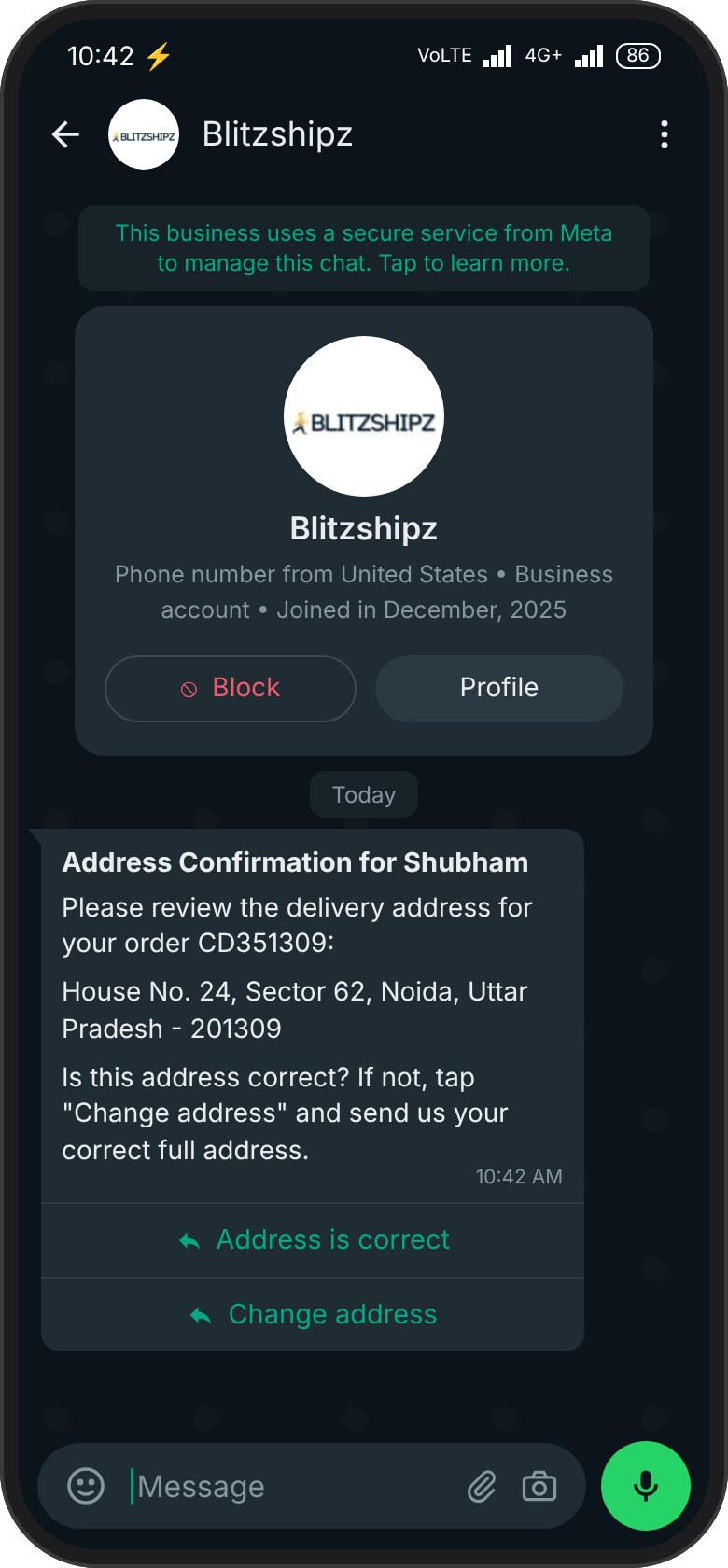
Right after the buyer confirms a COD order, they get their delivery address in the same chat and are asked one question: is this the correct, final address?
- Yes: the order moves ahead as it is.
- No: the buyer is asked to type the correct address in the chat.
You decide what happens to that new address in your BlitzShipz panel:
- Auto update: the new address replaces the old one on its own.
- Manual approval: you check the new address first and approve it.
Tip: Start with manual approval for a few weeks. You will see the kind of changes buyers make, like a missing flat number or a new landmark, and you can move to auto update once you trust the flow.
A wrong or half-written address is a common reason a parcel fails at the door. Fixing it in the chat before dispatch is far cheaper. Fixing it after a failed attempt costs a day, and sometimes the whole order. If a delivery still fails, our WhatsApp NDR alerts tell your team straight away.
Which WhatsApp Order Updates Do Buyers Get?
Once WhatsApp updates are turned on, your buyer gets a message at three points: when the order is booked and the AWB is generated, when the courier picks up the parcel, and when it is delivered.
These WhatsApp order updates answer the question every buyer asks: where is my order? When the answer reaches them before they think to ask, fewer of them call or message your team. You can follow the same shipment in your dashboard, whichever courier partner carries the parcel, and buyers can track it on a branded tracking page with your logo and colours.
How Does BlitzShipz Help COD Sellers Ship With Fewer Surprises?
COD checks work best when the rest of your shipping sits in the same place. BlitzShipz gives you:
- Automatic order sync: orders from Shopify, WooCommerce and Wix, or through the Open API, come into BlitzShipz automatically through our store integrations, so COD orders from your store get their check without anyone copying details.
- Multiple courier partners: compare courier partners and choose the most suitable one for each shipment, all from a single dashboard.
- One dashboard with live tracking: shipments across all courier partners in one place, with real-time tracking.
- COD remittance: COD remittance runs on a T+4 cycle, with no hidden charges.
- Returns handled: reverse pickups follow your return policy through return management.
- Support: call +91-120-5106784 or chat on WhatsApp, Monday to Saturday, 9:30 AM to 6:30 PM.
Create your free account and switch on WhatsApp communication →
WhatsApp COD Confirmation FAQs
WhatsApp COD confirmation is a message sent to the buyer before a cash-on-delivery order ships. It shows the store name, product, price and COD amount, and the buyer taps Confirm or Cancel. On BlitzShipz, it goes out as soon as the COD order reaches your account.
If the buyer taps Cancel, the order stops before it ships. You pay no forward shipping and no return charge on that parcel. If the buyer taps Confirm, you ship knowing they are expecting the order.
Yes. The buyer taps Cancel in the COD confirmation message, and the order stops before it ships.
For most COD orders, yes. The buyer replies with one tap and nobody on your team has to dial. A phone call still helps for high-value orders, or addresses that need a conversation to sort out.
Yes. Confirmation lowers the risk, but it is not a guarantee. A buyer who confirmed can still refuse the parcel at the door, so keep following up on failed deliveries from your dashboard.
They are sent from BlitzShipz's official WhatsApp Business number, provided through Meta's WhatsApp Business Platform. Your store name is included inside every message, so the buyer knows which brand the order is from.
No. BlitzShipz sends the messages from its own WhatsApp Business number, so you don't need to set up a WhatsApp API yourself.
Yes. After the buyer confirms a COD order, they get their address on WhatsApp. If they tap No, they type the correct address, and it reaches your BlitzShipz panel.
No. You choose in your panel. With auto update, the new address replaces the old one on its own. With manual approval, you check and approve each change first.
Once updates are turned on, buyers get a WhatsApp message when the order is booked and the AWB is generated, when the courier picks up the parcel, and when the parcel is delivered.
Yes, for orders from stores that ship with BlitzShipz. After a buyer confirms a COD order, they get their delivery address on WhatsApp, with the store's name in the message, and are asked if it is correct. They tap Yes, or tap No and type the right address.
Explore Our Other Services
One dashboard covers every way BlitzShipz moves your orders.
Express Delivery
The fastest courier on your route, with same day pickup and live tracking.
Learn moreSame Day Shipping
Book before your city's cutoff and the order delivers the same day.
Learn moreCOD Services
Cash on delivery with remittance tracking and RTO reduction built in.
Learn moreBulk Shipping
Volume rates, batch pickups and CSV or API uploads for high volume sellers.
Learn moreReturn Management
Fewer failed deliveries and reverse pickups tracked back to your warehouse.
Learn moreDoor-to-Door Delivery
Courier pickup from your location and delivery to any doorstep, no drop-offs.
Learn moreShipping Rate Calculator
Check rates, TAT and serviceability across courier partners before you book.
Learn moreShipment Tracking
Every order across courier partners in one dashboard, with a branded tracking page.
Learn moreNDR Management
AI calling, manual calling or a dedicated NDR team for failed deliveries.
Learn moreAsk first. Ship second.
Let BlitzShipz check every COD order with your buyer on WhatsApp, fix the address before dispatch and, once updates are turned on, keep them informed until delivery.